Social advocacy is a powerful thing. Your employees’ networks are valuable marketing assets that can generate far more engagement than corporate channels.
That’s why smart organizations use employee advocacy to elevate their social media marketing. Oktopost is here to help on this journey: our latest updates to the Advocacy Board will allow you to improve advocates’ experience, boost engagement and streamline content management at scale.
For Advocates
New Publishing Tools
As you might already know, we added quite a few cool features to our social publishing platform. Some of them are now also available to advocates, such as an emoji picker and hashtag autocomplete.

Emojis are a huge part of how people express themselves on social media – our latest improvement will enable your advocates to add their own voice to brand messages.
The new autocomplete feature offers trending hashtags, which is a great way to amplify your content reach and help your advocates grow their networks.
Reshares (Finally!)
Now advocates can reshare messages as many times as they want.
If you have evergreen content on your board, this update will be very useful. It will also come in handy for companies that send out links to new advocacy messages via Slack, Chatter or other channels (in addition to Oktopost’s native notifications) to all advocates, regardless of whether they already shared it or not.
When opening an already shared message, advocates will see how long ago they shared it:

They can reshare messages by clicking on a button in the upper right corner of the Post Details window:

Feed Improvements
We also improved and unify how messages are displayed across the platform, to make it more interesting for your advocates. From now on they will see a full preview for post attachments (images, video or links) on their feeds and inside the post console.
Our new layout for content notification emails will include post attachment previews as well:
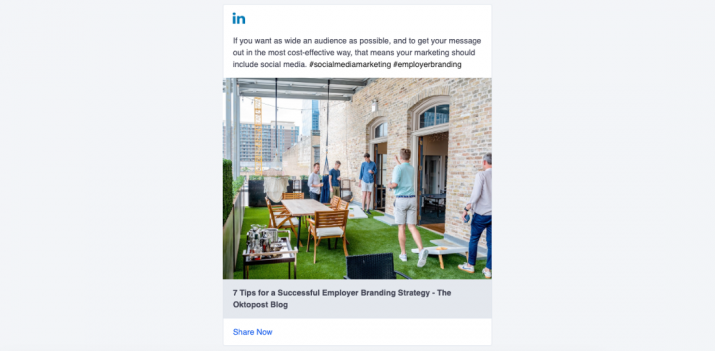
For a more advanced experience, we’ve activated hashtags and mentions in LinkedIn messages inside the Board. Now you can click on a mention to navigate to the user’s profile or click on a hashtag to get to a LinkedIn hashtag feed.
For Admins
Message Management At Scale
We improved the way program admins manage large quantities of messages – for faster and more flexible content distribution.
On the Messages page, we now display topic names instead of color-coding. No more guesswork:

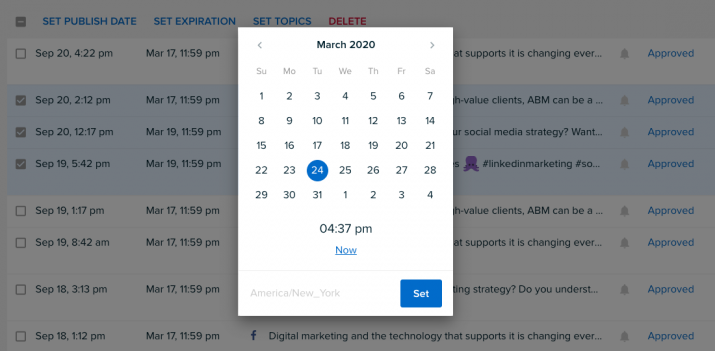
You can also set each bulk action (Set Publishing Date, Set Expiration Date, Set Topics) separately.
Now admins will be able to add an exact time to a message expiration date:
Updated Email Notifications
Many of our customers operate globally, and communication between offices can be challenging sometimes. To help battle these issues, Oktopost now sends notifications about new content according to the user’s timezone. It means every advocate will receive these emails at the most optimal time.
Finally, admins will be able to set email notifications for advocates’ new suggestions (in addition to in-app notifications that we’ve had before).
All these changes are already available on your advocacy board. As always, we will be happy to hear what you think about our latest updates: drop us a line to contact@oktopost.com.
from The Oktopost Blog https://ift.tt/2lgXmuo
via IFTTT
Comments
Post a Comment