
HubDB HQ: An Easier Way to Create and Edit HubDB Tables

Have you been using HubDB to create tables for your site? If you’re scratching your head - HubDB is a relational data store represented as rows, columns, and cells - much like a spreadsheet. While it’s an excellent application for your website, what if we told you there was a way to enjoy the same functionality but with a slicker interface?

Introducing HubDB HQ

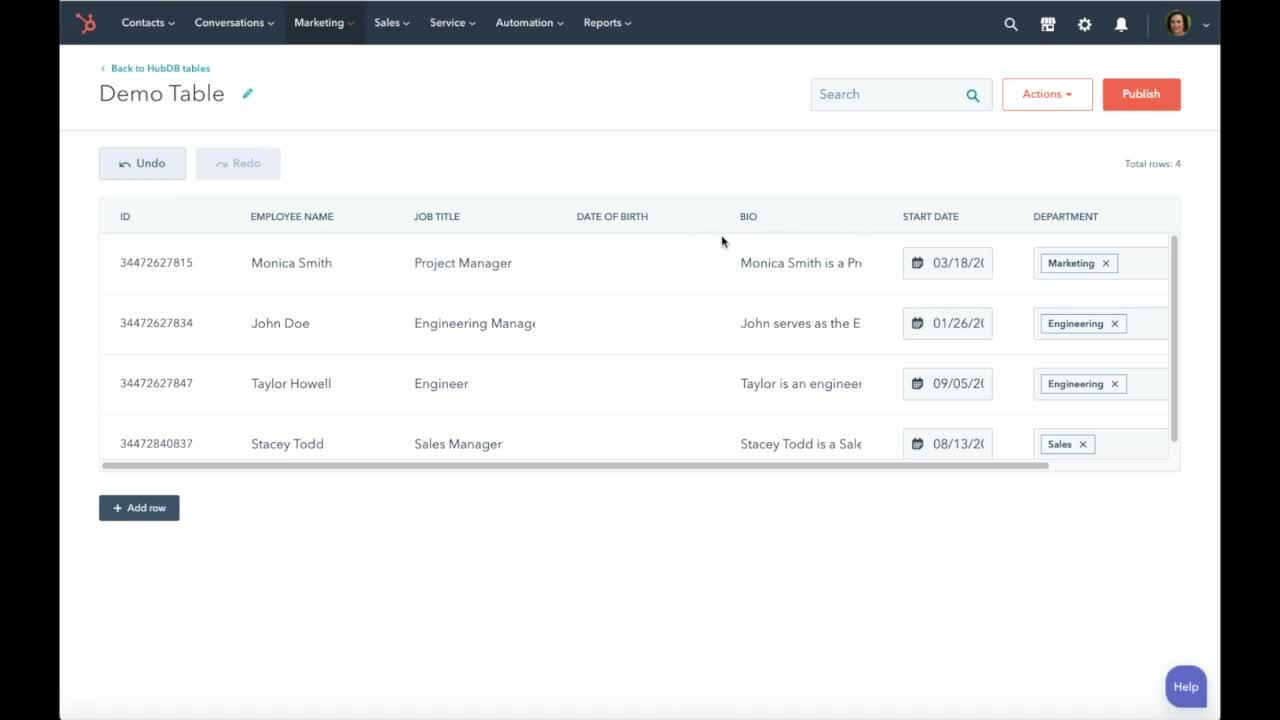
HubDB HQ was built by Lynton developers who use HubSpot and its tools like HubDB every day but wanted a way to streamline the user experience. The main goal of HubDB HQ is to provide users a way to edit HubDB tables more quickly, saving time and effort, which can then be put toward more significant picture projects.
HubDB Hq (2)

Key Features of HubDB HQ

Like the HubDB Editor, you can create, edit, publish, and export table data to build stunning tables. However, unlike HubDB Editor, HubDB HQ comes with additional features to improve your experience when making tables. As mentioned, the main feature of HubDB HQ is a pared-down, easier-to-edit, faster version. After registering for HubDB HQ  -- free for all HubSpot users – you can connect to your portals and enjoy:

  • Real-time updates between HubDB HQ and your HubSpot account, meaning what happens in your HQ account automatically occurs in the regular HubDB Editor.
  • Sorting capabilities so you can sort rows by text, date, or number field instantly rather than digging around for the row you need.
  • Faster row editing that lets you edit every column in a row at once.
  • A drag-and-drop editing experience for columns, making it simple to rearrange the order, add, or remove columns.
  • Multi-portal editing capabilities, which allow you to toggle between portals to update tables across multiple accounts quickly.
  • Paginated, or shortened rows, to eliminate the constant scrolling to find the row or column you need to adjust.

The best feature? As long as you know how to structure a table, anyone can use HubDB HQ without needing a developer’s help and work smarter, not harder.

Check Out HubDB HQ Today

If you’re ready to use HubDB HQ, visit the marketplace today and connect the app. For any help setting it up or using the tool, reach out to a Lynton representative here.


from Inbound Marketing Blog https://ift.tt/3iBPwTC
via IFTTT

Comments

Popular posts from this blog

What is a Local Citation? Local SEO

In simple SEO terms, a local citation refers to any mention of your company online. This could be in a business directory, or on an industry-specific site, a blog or any other local website. Although local citations can help you rank in local search results, they are no longer a major ranking factor . However, they are still worth considering in order to promote your business. Common citations you are likely to already know of include listings on business directory websites such as Yell or Thomson Local . A complete citation should include the name, address and phone number of your business. Local citations do not always include a link to your site although they are more valuable if they do. What do they do? Citations help rank your Google Local Pack listing (this was formerly called Google+ Local map) by providing Google with credible sources of information about your business. Citations tell Google that your business exists, is legitimate and that what you say about it is accur...

The beginner’s guide to semantic search: Examples and tools

Ever since Google’s Hummingbird, the term “semantic search” has been thrown around a lot. Yet, the concept is often misunderstood. What is semantic search and how it helps SEO efforts? When people speak to each other, they understand more than just words. They understand the context, non-verbal cues  (facial expressions, nuances of the voice, etc.) and so much more. It comes naturally, so we don’t really appreciate how difficult it is to explain what is being communicated without the help of all “beyond-words” signals. Factors that make the lives of both Google and SEO so difficult Google is trying (and often struggling) to understand what it is that their users want (without actually seeing or hearing them) SEOs are trying to reverse-engineer what it is that Google managed to understand from their users’ queries and how to build pages that meet those mysterious criteria. As Google’s algorithm is getting more mature, it is becoming even more difficult to decode what...

7 Boring SEO Tasks You Can Automate to Save One Day Per Week

An SEO expert’s day is filled with a plentitude of activities to rank well on Google , starting with taking care of basic content quality to backlinks, site structure, mobile user experience, and other technical features. Not to mention having to squeeze the time spent on each task between meetings, conference calls, emails, and urgent projects, which take up a large portion of the week. Before you can even think about finishing less-important SEO tasks, you are already running out of time. The truth is some tasks are too boring to complete at the end of a tiring day. But you can’t leave it on the table to handle some other day, as it will only overshadow other, more important tasks. So, what’s the way out? The good news is advanced online tools can handle your boring SEO tasks, helping you save at least one day per week for creative activities. Here are some of the boring SEO tasks you can automate now and save yourself from performing these tedious activities. 1. Automate SE...