Social media marketing is always changing.
We marketers have to be agile and constantly evaluate how different strategies, tools and platforms are performing. Not surprisingly, social networks do the same.
LinkedIn just introduced Product Pages, a part of its ecosystem dedicated to building a trusted community of information around B2B products.
To help you understand the value this new feature can bring you, let’s get a closer look at the what, why and how of LinkedIn Product Pages.
What is a LinkedIn Product Page?
According to LinkedIn, Product Pages is a hub for brands to promote their products and grow their businesses, for product users to share their experiences and be recognized for their expertise, and for buyers to make confident decisions about products in a trusted environment.
The main goal of LinkedIn Product Pages is to help organizations highlight their offerings. This feature can help B2B companies generate highly-qualified leads on social media and build a product community by spotlighting featured customers, gathering reviews, and driving valuable action.
Getting started with your Product Page
It shouldn’t take you more than 1-2 hours to set up your Product Page. If you have multiple offerings, you should create a separate page for each of your products.

Start with the About section where you can share a brief overview of your product (mind the 500-character limit). It should be clear, concise and focused on the user benefits.
To define the target audience for your product, you can choose up to 10 job functions – it will impact how LinkedIn shows your page in search results, so be strategic about it.
To bring your page to life, upload videos, product images and screenshots. LinkedIn recommends adding videos that cater to different buying stages, from a brand video (top-of-funnel) to a customer testimonial video (bottom-of-funnel).
Finally, make sure to customize your CTA button to drive valuable action – currently, LinkedIn offers six different options, from Learn more to Request a demo. Don’t forget to add UTM tags to your URL, so you can measure and evaluate how effective is your product page in terms of traffic.
In case you need inspiration, here are Linkedin’s own product pages: Campaign Manager, Sales Navigator, Recruiter, Talent Insights.
Now you’re all set and ready to build social proof by gathering product reviews and spotlighting customers.
LinkedIn Customer Reviews
The most noteworthy section of the new Product Pages where your LinkedIn followers and visitors can provide feedback on your products through rating-based, free-form reviews that will be publicly visible on the product page.
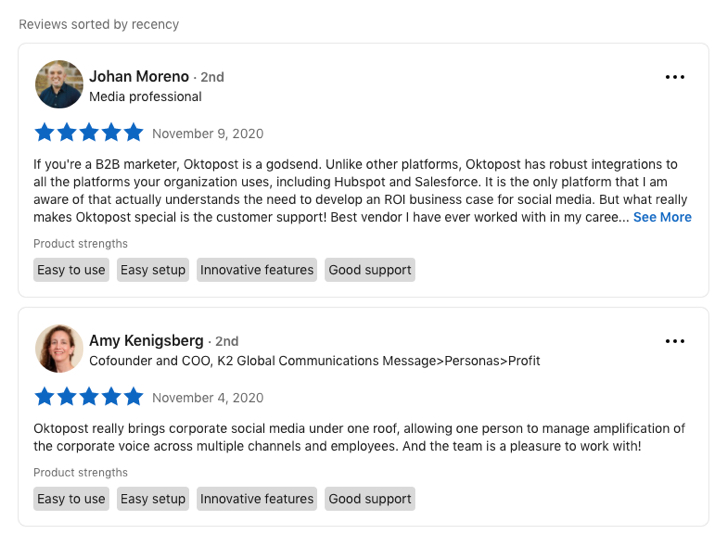
The process is faster and easier than on G2 or Capterra. LinkedIn reviews also provide more social proof: there are no anonymous posts, you see each reviewer’s name, job title and company, plus mutual connections if you have any.
As we know all too well, happy customers rarely leave reviews without a call to action from the product provider. So you will need to actively encourage your brand champions to rate you on LinkedIn. According to this TrustRadius survey, the majority of B2B buyers expect brands to have at least 10 reviews to be considered relevant (this number may vary depending on your size and industry).
LinkedIn Featured Customers
In addition to reviews, LinkedIn Product Pages have the Featured Customers section where you can spotlight your existing customers.

The rule of thumb would be to tag customers that already agreed to public disclosure (your case study participants and customer testimonial stars) or to specifically ask for permission to mention them on your LinkedIn Product Page. The companies you highlighted can choose to remove themselves from your page if they don’t want to be displayed as a customer.
Your featured customer selection should be strategic too – to reflect your target verticals and company sizes.
Takeaways
Here’s our verdict: the ease of LinkedIn’s reviews and the overall popularity of the network can potentially make it a strong player among peer-to-peer business software review websites. So it’s probably a good idea to get prepared for prospects checking your LinkedIn product page for buying recommendations from their professional peers.
from Oktopost https://ift.tt/3lpqZ6P
via IFTTT
Comments
Post a Comment